ဒီဘေလာ့ေလးသည္ ဗုဒၶျမတ္စြာ ဘုရား၏ အရိပ္ေအာက္တြင္ရွိေသာေၾကာင့္ ေရာက္လာသူအေပါင္း ကိုယ္စိတ္ႏွစ္ျဖာ က်န္မာ ရႊင္လန္း ၾကပါေစ။********************<>*<>....................ဆရာၾကီးတစ္ေယာက္ မဟုတ္သိအတြက္ အမွားပါလွ်င္ လည္းနားလည္ေပးၾကပါ လုိအပ္တာရွိရင္ ေျပာေပးၾကပါ အၾကံဥာဏ္ေလးေပးၾကပါ အားလုံးကုိေက်းဇူးတင္ပါတယ္။ ကြ်န္ေတာ္ဘေလာ႔တြင္ကြ်န္ေတာ္ႏွင့္အတူနည္းပညာမ်ားကုိမွ်ေ၀ခ်င္တယ္ဆုိရင္ maungruper@gmail.com ကုိ mail ပုိ႔ျပီး၀င္ေရာက္မွ်ေ၀လုိ႔ရပါတယ္။ နည္းပညာ ညီကုိေမာင္ႏွမ မ်ားကုိလည္း ေႏြးေထြးစြာၾကိဳဆုိလွ်က္ပါ။

Friday, January 10, 2014

iOS သမားမ်ားအတြက္ Apple ID ျပဳလုပ္နည္း

မဂၤလာပါ  ဒီတစ္ခါေတာ့ တဂ်ီဂ်ီတပြမ္ပြမ္နဲ႔ ေတာင္းေနၾကတဲ့ Apple ID ကို ကိုယ္တိုင္လုပ္တတ္ေအာင္ လုပ္နည္းေလးေရးေပးမွာျဖစ္ပါတယ္.. သိၿပီးသားျဖစ္ေသာ ကိုကို မမမ်ား ဤပို႔စ္ကို ေက်ာ္သြားလုိက္ပါခင္ဗ်ာ မသိေသးေသာ သူမ်ားအတြက္ ေရးေပးျခင္းျဖစ္ပါတယ္။ ကဲစလိုက္ႀကရေရာင္ ပထမဆံုးေရးေပးမွာကေတာ့ ဖုန္းနဲ႔ဖြင့္နည္းျဖစ္ပါတယ္။

ပထမဆံုးအေနနဲ႔ မိမိဖုန္းထဲကေန App Store ကိုဖြင့္ပါ ၿပီးရင္ မိမိႏွစ္သက္ရာ Free app တစ္ခုကိုေဒါင္းလိုက္ပါ...


ၿပီးသြားရင္ေတာ့ apple ID ေတာင္းပါလိမ့္မယ္ အဲဒီေနရာမွာ Create New Apple ID ကိုႏွိပ္ၿပီးေတာ့သြားလိုက္ပါ


ၿပီးသြားရင္ေတာ့ Store ကိုမေလးရွားလို႔ေရြးေပးလိုက္ပါ..  Next ကိုႏွိပ္ Agree ကိုႏွိပ္ၿပီးေတာ့ ဆက္သြားလိုက္ပါ


ေနာက္စာမ်က္ႏွာ ေရာက္ၿပီဆိုၿပီဆိုရင္ေတာ့ မိမိ Email နဲ႔ မိမိအသံုးျပဳမည့္ password ထည့္ပါ။ Password ထည့္တဲ့ေနရာမွာ အနည္းဆံုး 8 လံုးထည့္ရမွာျဖစ္ၿပီး စာလံုးႀကီးတစ္လံုးႏွင့္ ဂဏန္းမ်ားပါဝင္ရမွာျဖစ္ပါတယ္ အလြယ္ဆံုးနည္းကေတာ့ ပထမဆံုးစာလံုးကို အႀကီးနဲ႔ေရးၿပီး က်န္တာကို ပံုမွန္ေရးသြားလိုက္ပါ အဆင္ေျပမွာပါ ဥပမာ= Moenyothar12345 အဲလိုမ်ဳိးေပါ့။ ၿပီးသြားရင္ Question နဲ႔ Answer မွာ မိမိမွတ္မိလြယ္မည့္ ေမးခြန္းနဲ႔ အေျဖကုိထည့္ပါ အေရးႀကီးပါတယ္။ တစ္ခ်ိန္ခ်ိန္မွာ မိမိ Password ေမ့သြားခဲ့ရင္ ျပန္ထည့္ေပးရမွာျဖစ္ပါတယ္။ ေနာက္ထပ္ ေမြးေန႔ ရက္ လ ေတြကိုထည့္ပါ ၿပီးရင္ Next ကိုႏွိပ္ၿပီးေတာ့ ဆက္သြားပါ။


ကဲအခုဆိုရင္ေတာ့ Billing Information  ထည့္ရမည့္ေနရာကိုေရာက္ပါၿပီ ဒီေနရာမွာ Visa , MasterCard , Amex , None ဆိုၿပီးေတာ့ ရွိပါတယ္။ ဒီေနရာမွာ ေျပာစရာရွိပါတယ္ အေပၚမွာကၽြန္ေတာ္ေျပာခဲ့သလို Free app ကို ႏွိပ္မလာမိရင္ေတာ့ None ဆိုတာ ေပၚမွာမဟုတ္ပါဘူး။ None ကိုအမွန္ျခစ္ျခစ္ေပးလိုက္ပါ။ ၿပီးရင္ က်န္တာေတြဆက္ထည့္ရေအာင္ Title မွာ Mr/Ms ေရြးပါ။ First Name ထည့္ Last Name ထည့္ပါ။ Address ေနရာႏွစ္ခုစလံုးမွာ Balakong လို႔ေရးထည့္ပါ. Postcode ေနရာမွာ 43300 လို႔ထည့္ပါ။
Town ေနရာမွာ Seri Kembangan လို႔ေရးထည့္ပါ... County မွာ Kuala Lumpur ကိုေရြးေပးလို္က္ပါ. ၿပီးသြားရင္ေတာ့ ဖုန္းနံပတ္ကို မိမိႀကိဳက္တာထည့္ပါ. ၿပီးသြားရင္ေတာ့ Next ကိုႏွိပ္ပါ ၿပီးသြားရင္ေတာ့ Verify Your Account ဆိုၿပီးေတာ့ မိမိ အီးေမးလ္မွာ Verify လုပ္ဖို႔ေျပာပါလိမ့္မယ္ ဒါဆိုရင္ Account လုပ္ျခင္းၿပီးဆံုးပါၿပီ.


ၿပီးသြားရင္ေတာ့ ေစာေစာကထည့္ခဲ့တဲ့ Email ကိုဖြင့္ၿပီးေတာ့ Apple ကပို႔ထားတဲ့ mail ကိုဖြင့္ပါ.ၿပီးေတာ့ Verify Now ဆိုတာကို ႏွိပ္ၿပီးေတာ့ ထည့္ခဲ့တဲ့ ID နဲ႔ Password ကိုထည့္ေပးလိုက္ပါ.. ၿပီးၿပီဆိုရင္ေတာ့ Apple ID ကိုစတင္ၿပီးေတာ့ သံုးလို႔ရပါၿပီ။ အဆင္ေျပၾကပါေစဗ်ာ။ ဒါကေတာ့ ဖုန္းနဲ႔ဖြင့္တဲ့နည္းလမ္းျဖစ္ပါတယ္။


ကြန္ပ်ဴတာနဲ႔ ဖြင့္မည့္သူေတြကေတာ့ ကြန္ပ်ဳတာမွာ iTunes ရွိရမွာျဖစ္ပါတယ္ မရွိေသးရင္ ဒီေနရာကို ႏွိပ္ၿပီးေတာ့ သြားယူလိုက္ပါ။ ကြန္ပ်ဴတာမွာ iTunes  ရွိၿပီဆိုရင္ iTunes ကိုဖြင့္ပါ။ iTunes ရဲ႕ အေပၚဘက္ ညာဘက္ေထာင့္မွာ ရွိတဲ့ iTunes Store ဆိုတဲ့ေနရာေလးကိုႏွိပ္လိုက္ပါ..


iTunes Store ကိုေရာက္ၿပီဆိုရင္ App Store ဆိုတာကို ထပ္ႏွိပ္ပါ။ App Store ထဲေရာက္သြားပါလိမ့္မယ္။


 ေရာက္ၿပီဆိုရင္ အထဲမွာ ရွိတဲ့ Free App တစ္ခုကို  ႏွိပ္လိုက္ပါ


App နဲ႔ပတ္သက္တာေတြ ၾကလာပါလိမ့္မယ္ Icon ေအာက္က Free လို႔ေရးထားတာကို ႏွိပ္လိုက္ပါ apple ID နဲ႔ Password ထည့္ရန္ က်လာပါလိမ့္မယ္။


Box က်လာပါက Create Apple ID ကိုဆက္ႏွိပ္ပါ..


ၿပီးရင္ ေအာက္မွာျပထားတဲ့  ပံုပါအတိုင္း Continue ဆိုတာကိုႏွိပ္ပါ.. ေနာက္ထက္စာမ်က္ႏွာသို႔ေရာက္ပါလိမ့္မည္


ဒီစာမ်က္ႏွာမွာေတာ့ I have read and agree to these terms and conditions ဆိုတာကို အမွန္ျခစ္ေပးၿပီးေတာ့ Agree ကိုဆက္ႏွိပ္ပါ ..


Apple ID ဖြင့္တဲ့ေနရာကို ေရာက္ပါၿပီခင္ဗ်ာ .. က်န္တာေတြကေတာ့ ဆက္ၿပီးေတာ့ လုပ္တတ္လိမ့္မယ္လို႔ ေမ်ာ္လင့္ပါတယ္.. အေပၚမွာေရးခဲ့တဲ့ ဖုန္းနဲ႔ဖြင့္နည္းမွာ ဒီအဆင့္ကေနစၿပီးေတာ့ အကုန္အတူတူပါပဲ


အဆင္မေျပတာမ်ားရွိခဲ့ရင္ Comment ေပးခဲ့ၾကပါ. အဆင္ေျပၾကပါေစဗ်ာ..

..

အင္တာနက္ျမန္ႏႈန္းကို ျမင့္ေစမယ့္ေဆာ့၀ဲ ( For Rooted Androids Only)

ကၽြန္ေတာ္တို႔ရဲ႕ ဖုန္းေတြထဲမွာ
ကၽြန္ေတာ္တို႔ရဲ႕ အင္တာနက္လိုင္းကို
အျမဲတေစ ယူသံုးေနတဲ့
Application ေတြရွိေနတာကို
ဖုန္းသံုးေနတဲ့ သူငယ္ခ်င္း
အားလံုးနီးပါး သိၾကမွာပါ
ကိုယ့္အတြက္အသံုး၀င္လို႔
အင္တာနက္ခ်ိတ္ဆက္ျပီး
အသံုးျပဳတာက ဘာမွမျဖစ္ေပမယ့္
ဖုန္းမွာ Original ပါ၀င္ျပီး
ကၽြန္ေတာ္တို႔အတြက္လည္း အမွန္တကယ္ အသံုးမ၀င္ပဲ အင္တာနက္ကုိ ခ်ိတ္ဆက္
အသံုးျပဳေနတဲ့ Application ေတြကေတာ့ ကၽြန္ေတာ္တို႔ရဲ႕ မစို႔မပို႔ ကြန္နက္ရွင္အတြက္ တကယ္ကုိ အေႏွာက္အယွက္ပါပဲ ...


Tuesday, January 7, 2014

DHCP Problems (Myanmar E-Book)


စာအုပ္အမည္= DHCP Problems
အမ်ဳိးအစား   =PDF
အရြယ္အစား =251.10 Kb

                                            
                                                     Download from Dropbox

                                                     Download from Dev-Host               

Facebook v6.0.0.0.18 apk (Last Version) ေနာ္


facebook v6.0.0.0.18 ေနာက္ဆုံးထြက္versiomကိုမွသုံးခ်င္သူမ်ားအတြက္တင္ေပးလိုက္ပါတယ္၊ စမ္းသပ္version ဆိုေပမယ့္ေပါ့ပါးသြတ္လပ္လာေတြ႔ရပါတယ္၊group ေတြမွာphoto commendေပးလိုသူမ်ားအတြက္လည္းအဆင္ေျပပါတယ္ လိုခ်င္ရင္ေအာက္မွာယူ လိုက္ပါေနာ္
အားလုံးအဆင္ေျပၾကပါေစ..................


                                                 DAWNLOAD


Sunday, January 5, 2014

Facebook V 6.0.0.0.15 APK (Last Version)

                               
   Facebook ေနာက္ဆံုးထြက္ Version ကိုတင္ေပးလိုက္ပါတယ္ဗ်ာ။ ယခုထြက္တဲ့ Version ကေတာ့ 6.15  ျဖစ္ပါ တယ္။ Android OS 4.0       ႏွင့္အထက္ဖုန္းမ်ားမွာအသံုးျပဳႏိုင္မွာျဖစ္ပါတယ္ဗ်ာ။ ေနာက္ဆံုးထြက္ Version ကိုမွ အသံုးျပဳခ်င္သူမ်ားအတြက္ ေအာက္မွာေဒါင္းယူႏိုင္ပါျပီဗ်ာ။

                                                DAWNLOAD HERE
 ကဲအားလုံးအဆင္ေျပၾကပါေစ........:)

Friday, January 3, 2014

Android သမားေတြအတြက္next launcher 3d apk

..
Android သမားေတြအတြက္ ( ၃. ၁. ၂၀၁၄ ) ရက္ေန ့ထုတ္ next launcher 3d apk ပါ
playstore မွာ ဘတ္ ( ၅၀၀ ) ေက်ာ္ ေက်ာ္ေပးရပါတယ္.....အသံုးျပဳလိုတယ္ဆိုရင္ အခမဲ ့ယူသြား
လိုက္ပါ..android version 2.2 အထက္မွာအသံုးျပဳလို ့ရျပီး ဖိုင္ဆိုဒ္ကေတာ့ ( 9MB ) ပါ......
   
                                                                                               Criad~စုိင္းသူ

Vroot 1.7.4 ထြက္ၿပီ

..
Root လုပ္တဲ႔ေဆာ့၀ဲထဲမွာ ဆရာႀကီးလို႕
အမည္တပ္ရေအာင္ နာမည္ႀကီးၿပီး တကယ္ေကာင္းတဲ႔
Vroot ေလး 1.7.4 ေလး ထြက္ရွိလို႕ လာခဲ႔ပါၿပီ
File Size:6.5MB

ေဆာ့၀ဲလ္ျမိဳ႕ေတာ္မွ ကူးယူမွ်ေ၀ပါသည္

အင္တာနက္ Connection ကိုျမွင့္တင္ေပးမဲ့ Fast Speed Internet ( for Android )

..
 
အားလံုးပဲမဂၤလာပါခင္ဗ်ာ. ကၽြန္ေတာ္ဖ်ားေနတဲ့အတြက္
Post ေတြမတင္ျဖစ္တဲ့အတြက္ေတာင္းပန္ပါတယ္ခင္ဗ်ာ.
အခု အင္တာနက္ကိုစြဲစြဲျမဲျမဲသံုးတတ္တဲ့မိတ္ေဆြမ်ားအတြက္
အသံုး၀င္မဲ့ေဆာ့ဖ္၀ဲေလးကိုတင္ေပးလိုက္ပါတယ္ေနာ္.
facebook , youtube အစရွိတဲ့ site ေတြကိုလဲ speed
ျမန္ျမန္နဲ႕သံုးလို႕ရေအာင္ကူညီေပးႏုိင္တဲ့ ေကာင္ေလးပါ.
ျမန္မာႏိုင္ငံအင္တာနက္လုိင္းနဲ႕ဆိုရင္ေတာ့ဒီေကာင္ေလးက
ကူညီေပးပါလိမ့္မယ္ေနာ္. ကဲ.. ေအာက္မွာေဒါင္းယူႏုိင္ပါတယ္..
ကၽြန္ေတာ့္ဆိုဒ္မွာ IT Sky ဆိုတဲ့ Admin တစ္ဦးတင္ထားတာေလးေကာင္းလို႕ ျပန္လည္မွ်ေ၀ေပးတာပါဗ်ာ။

FileRecovery Pro Enterprise 5.5.4.8 x86/x64 Full + Crack


ဖုန္းေတြ.. Memory Card ေတြ .. USB Pendrive ေတြ Hard Disk ေတြကေန အေၾကာင္းအမ်ဳိးမ်ဳိးေၾကာင့္ မွားယြင္းဖ်က္မိတာပဲ ျဖစ္ျဖစ္၊ Format ခ်မိတာပဲျဖစ္ျဖစ္ ပ်က္စီးေပ်ာက္ဆံုးသြားတဲ့ data ေတြကို ျပန္လည္ recovery လုပ္ယူေပးမယ့္ေဆာ့ဝဲလ္ေလးျဖစ္ပါတယ္။။ ေဆာင္ထားသင့္တဲ့ အသံုးဝင္ေဆာ့ဝဲလ္ေလးပါ 32bit နဲ႔ 64bit ႏွစ္မ်ဳိးစလံုးအတြက္ထည့္ေပးထားပါတယ္ မိမိတို႔ windows နဲ႔ကိုက္ညီတဲ့ဟာကို ေရြးၿပီးေတာ့ သံုးၾကပါ။ လိုခ်င္တဲ့သူမ်ားရွိရင္ ေအာက္ကလင့္မွာ ေဒါင္းယူလိုက္ပါ.. အားလံုးပဲ အဆင္ေျပၾကပါေစဗ်ာ


Download Link >>> ( Zippyshare :: MiloShare :: TusFiles )
..

MiniTool Partition Wizard Professional Edition 8.1.1 Full + Keygen ေဒါင္းရန္


မဂၤလာပါဗ်ာ.. ဒီေဆာ့ဝဲလ္ေလးကေတာ့ MiniTool Partition ေလးပါ.. တနည္းအားျဖင့္ေျပာရရင္ partition Manager ေဆာ့ဝဲလ္ပါ. Hard Disk ေတြကို Resize Partition, Move Partition, Merge Partition, Extend Partition, Split Partition, Change Cluster Size, Copy Partition, Copy Disk, Create, Delete and Format partitions, Convert and Explore partitions, Hide and Unhide partitions, Convert Dynamic Disk to Basic Disk အျပင္အျခားလုပ္ေဆာင္ခ်က္ေတြလည္းရွိပါေသးတယ္.. လိုအပ္တဲ့သူမ်ားရွိရင္ ေအာက္ကလင့္မွာ ေဒါင္းယူသြားလိုက္ပါဗ်ာ အဆင္ေျပၾကပါေစေနာ္.. :D


Download Link>>> ( Zippyshare :: Miloshare :: TusFiles )
..

Facebook v6.0.0.0.11 APK (Latest Version)

..
http://www.tecnigen.com/wp-content/uploads/2013/08/Facebook-APK-for-Android-Download.jpg

Facebook ေနာက္ဆံုးထြက္ Version ကိုတင္ေပးလိုက္ပါတယ္ဗ်ာ။ ယခုထြက္တဲ့ Version ကေတာ့ 6.0 ျဖစ္ပါ တယ္။ Android OS 4.0 ႏွင့္အထက္ဖုန္းမ်ားမွာအသံုးျပဳႏိုင္မွာျဖစ္ပါတယ္ဗ်ာ။ ေနာက္ဆံုးထြက္ Version ကိုမွ အသံုးျပဳခ်င္သူမ်ားအတြက္ ေအာက္မွာေဒါင္းယူႏိုင္ပါျပီဗ်ာ။
 **  Step-1.ေအာက္က Download Button ကိုႏွိပ္လိုက္ပါ  
**  Step-2. "5sec". ေလာက္ေစာင္႕ေပးပါ။

**  Step-3. "  << SKIP AD >>   ".ကိုႏွိပ္ေပးပါ။
**  Step-4. Download Link က်လာပါလိမ္႕မယ္။
**  အဆင္ေျပပါေစဗ်ာ။

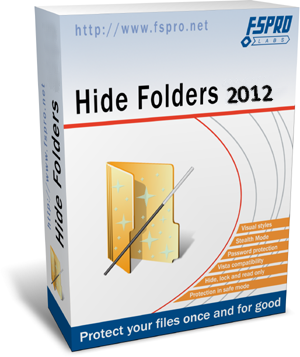
Hide Folders v4.3.7 Final + Crack

..
http://www.fullprogramlarindir.com/wp-content/uploads/2013/12/Hide-Folders-2012-4..png
ကြန္ျပဴတာထဲမွာ ရွိတဲ့ မိမိရဲ႕ Personal Data ေတြကို အျခားသူမ်ားမၾကည့္ႏိုင္ေအာင္လို႕ Hide Folders ေနာက္ ဆံုးထြက္ Version ေလးတင္ေပးလိုက္ပါတယ္ဗ်ာ။ သူ႕ရဲ႕လုပ္ေဆာင္ခ်င္ေလးကေတာ့ မိမိမျမင္ေစခ်င္တဲ့ Data ေတြကို Hide လုပ္ထားႏိုင္ပါတယ္။ Lock ခ်ထားႏိုင္ပါတယ္။ Read Only လုပ္ထားႏိုင္ပါတယ္။ Hide & Lock လုပ္ထားႏိုင္ပါတယ္။ သူ႕ကလည္း ကၽြန္ေတာ္စမ္းျပီးကလိၾကည့္ရသေလာက္ေတာ့ Save ျဖစ္ပါတယ္။ NTSF , FAT , FAT32 အားလံုးမွာအသံုးျပဳႏိုင္ပါတယ။ Window OS အေနနဲ႕ကေတာ့ XP , Vista , 7 , 8 , 8.1 အားလံုးမွာအသံုးျပဳႏိုင္ပါတယ္။ အျမဲတမ္းသံုးႏိုင္ေအာင္ Crack Fie ကိုပါထည့္ေပးထားပါတယ္ဗ်ာ။ အေသး စိတ္သိခ်င္ရင္ေတာ့ေအာက္မွာေလ့လာႏိုင္ပါတယ္။


Hide Folders 2012 an easy tool for hiding your sensitive information from prying. The program allows you to hide entire folders on computers running Windows. Very convenient and easy to use, simply drag a folder in the concealed window and pressing a single button. Hide Folders 2012 program was designed to help you keep your secrets secret. Below are just some of the characteristics of programs that allow it to effectively and simply solve the problem of protecting your privacy.Features and capabilities of the program:
Effective protection methods allow you to hide files and folders from other users on Windows XP and Windows Vista, 7, 8.8.1
Hidden files and folders are available only to you and nobody else.
4 protection methods available: Hide, Lock, Hide & Lock, Read Only.
Supports all file systems: NTFS, FAT, FAT32
Supports file masks, which allow you to protect only certain types of files
Unlimited number of protected sites.
Trusted Processes, allow you to back up your files in a secure state.
The program does not modify the file system – all protection is provided in the file driver.
Password protection on startup Hide Folders 2012.
Password protection removal program Hide Folders 2012.
Removing Hide Folders 2012 manual does not lead to the disclosure of information
When you try to delete top-level folders, secure files and folders are not removed.
Multiple options to hide the traces of hidden files and the program itself.
Anti-blocking system folders.
stealth mode – driver protection is not visible in Task Manager Windows.
Data protection in security Windows.
Hot keys.
Manage the command line.
Integration with Windows
Protect folders, called on Russian and any other languages.
An intuitive and simple user interface Maskimalno supporting sobstennyh visual styles

 **  Step-1.ေအာက္က Download Button ကိုႏွိပ္လိုက္ပါ  
**  Step-2. "5sec". ေလာက္ေစာင္႕ေပးပါ။

**  Step-3. "  << SKIP AD >>   ".ကိုႏွိပ္ေပးပါ။
**  Step-4. Download Link က်လာပါလိမ္႕မယ္။
**  အဆင္ေျပပါေစဗ်ာ။

GridinSoft Trojan Killer 2.2.0.4 + Key & Crack

..
Trojan ဆုိတာလည္း Virus ထဲမွာ ေၾကာက္စရာေကာင္းတဲ့ ျပသာနာေကာင္တမ်ိဳးပါဘဲဗ်ာ။ Trojan ထဲမွာမွ ကိုယ့္ရဲ႕ Data ေတြ Account ေတြကို ရန္ရွာႏိုင္တဲ့ Hacker ေတြဆီက Trojan ဆိုရင္ေတာ့ ေၾကာက္စရာ အေကာင္းဆံုးျဖစ္သြားျပီေပါ့ဗ်ာ။ ဒါေၾကာင့္ Trojan ေတြကို ႏိုင္ႏိုင္နင္းနင္းသတ္ႏိုင္တဲ့ GridinSoft Trojan Killer ေနာက္ဆံုးထြက္ Version ကိုတင္ေပးလိုက္တာပါ။ Trojan Killer က Trojan အျပင္ အျခား Virus ေတြျဖစ္ တဲ့ Adware , Spyware , Malware ေတာ္ေတာ္မ်ားမ်ား ကို Remove လုပ္ေပးႏိုင္ပါတယ္။ အျမဲတမ္းအသံုးျပဳ နိုင္ေအာင္ Full Version အျဖစ္ Serial Key နဲ႕ Crack File ႏွစ္မ်ိဳးလံုးထည့္ေပးထားပါတယ္ဗ်ာ။ အဆင္ေျပ တာနဲ႕သာသံုးၾကပါေနာ္။ အေသးစိတ္ကိုေအာက္မွာဆက္လက္ေလ့လာႏိုင္ပါတယ္။
Trojan Killer is designed specifically to disable/remove Malware without the user having to manually edit system files or the Registry. The program also removes the additional system modifications some Malware carries out which are ignored by some standard antivirus scanners. Trojan Killer scans ALL the files loaded at boot time for Adware, Spyware, Remote Access Trojans, Internet Worms and other malware. Trojan Killer works in the field of system security to ensure safety for computer systems. We propose products to help you get rid of annoying adware, malware and other rough tools. It is very important to restore control on your computer as soon as possible and do not allow anyone to use your data.Additional Tools
Reset Internet Explorer Home/Start/Search Page Settings
Some Malware programs make changes to the Internet Explorer Home, Start and Search Page settings in order to re-direct the web browser to different websites.
This Utility will reset the Home/Start/Search pages to standard Defaults. You can then manually reset your Home Page to your website of choice (or leave it “blank”, the default).
Reset HOSTS file
The Windows HOSTS file is a text file which stores website addresses. The file can be used to speed up access to websites you visit often – by equating the website name (e.g. microsoft.com) with its DNS address, the web browser can find the website more quickly as it does not have to query a DNS Name Server.
Some Malware programs add entries to this file, to either deny access to websites (usually security-related or antivirus company websites), or to re-direct access to websites of their choosing.
Reset Windows Update Policies
Some Malware programs attempt to prevent Windows Update from running, and inhibit access to resetting Windows Update by blanking out the Windows Update options on the Update configuration screen.
This Utility will check the current Windows Update settings and correct them where necessary.

 **  Step-1.ေအာက္က Download Button ကိုႏွိပ္လိုက္ပါ  
**  Step-2. "5sec". ေလာက္ေစာင္႕ေပးပါ။

**  Step-3. "  << SKIP AD >>   ".ကိုႏွိပ္ေပးပါ။
**  Step-4. Download Link က်လာပါလိမ္႕မယ္။
**  အဆင္ေျပပါေစဗ်ာ။

Thursday, January 2, 2014

Battlefield 4 PC Game (5Mb) ကြန္ျပဴတာဂိမ္း

ေတာင္းဆိုထားတဲ့သူငယ္ခ်င္းေတြအတြက္ Battlefield 4  PC  Game ေလးကိုတင္ေပးလိုက္ပါတယ္။
သူ႕ရဲ႕ဖိုင္ဆိုဒ္က 18.1.GB ရွိတာေၾကာင့္က်ြန္ေတာ္အေနနဲ႔ဘယ္လိုမွမတင္ႏိုင္ပါဘူး။ဒါေၾကာင့္သူငယ္ခ်င္း
တို႕အဆင္ေျပေအာင္ Torrent လင့္ကေနတင္ေပးလိုက္ပါတယ္။Torrent ေဆာ့စ္၀ဲမရွိတဲ့သူငယ္ခ်င္းေတြ
အတြက္ဘယ္လိုေဒါင္းေလာ့စ္ဖိုင္ထဲမွာ Torrent.exe ကိုပါထည့္သြင္းေပးထားပါတယ္။ဘယ္လိုအသံုးျပဳ
ရမလဲဆိုတာကအစ How to Use ဆိုတာကိုႏွိပ္ျပီးအရင္ဆံုးဖတ္ၾကည့္ပါ။သူငယ္ခ်င္းတို႔ရဲ႕ကြန္နရွင္ေပၚ
မူတည္ျပီးအခ်ိန္အကန္႔အသက္ၾကာျမင့္ႏိုင္ပါတယ္။ဒီအတြက္ပူစရာမလိုပါဘူး။ဘာေၾကာင့္လဲဆိုေတာ့
သူ႔ကိုတကူးတကၾကီးၾကည့္ေနစရာမလိုပါလႊတ္ထားလိုက္ရံုပါပဲ။ကြန္နရွင္အားအနည္းငယ္ရွိေနရံုနဲ႔အဆင္
ေျပပါတယ္။အေသးစိတ္ကိုေတာ့How to Use ဆိုတာကိုႏွိပ္ျပီးအရင္ဆံုးဖတ္ၾကည့္ပါ။ Torrent နဲ႔ပတ္သက္
လို႔ Torrent ဆိုတာဘာလဲလို႔သိခ်င္ရင္ေတာ့ ဒီမွာႏွိပ္ျပီး ၀င္ေရာက္ဖတ္ရႈ႕ႏိုင္ပါတယ္။


Year of release : 2013
Genre : Action FPS
Developer : EA Digital Illusions CE, DICE LA
Published by : Electronic Arts
Platform : PC
Publication Type : License
Language : Russian / English
Sound language : Russian / English
Tablet : enclosing (RELOADED) update 2

Operating System : Windows Vista / Windows 7/8
Processor : The processor (AMD): 4-core Processor (Intel): 2-core
Memory : 4 GB
Video Card : AMD Radeon HD 7870 / NVIDIA GeForce GTX 660
Sound Card : 100% DirectX 9 compatible sound card
Free space on hard drive : 25 GB of free space


က်ြန္ေတာ္တင္သမွ်ပိုစ့္ေတြ Facebook ကေနရယူခ်င္တယ္ဆိုရင္ ဒီမွာ Like ႏွိပ္ပါ 


http://adfoc.us/14251336551025 
(or)

http://adfoc.us/14251336554418 
(or)

http://bc.vc/BkBiK1 
(or)

http://adfoc.us/14251336554461 
နည္းပညာၿမိဳ႕ေတာ္

android ဖုန္း ကိုင္ထားတဲ ့မိတ္ေဆြေတြတိုင္းအတြက္ My Backup Pro ..

..


android ဖုန္း ကိုင္ထားတဲ ့မိတ္ေဆြေတြတိုင္းအတြက္ My Backup Pro ....
ကၽြန္ေတာ္တို ့ငယ္ငယ္ကတည္းက ခဲတံနဲ ့စာေရးရင္ ခဲတံေနာက္မွာ ခဲဖ်က္ ကေလးေတြေဆာင္ထားတာကို
အမွတ္ရဘူးမယ္ထင္ပါတယ္။ မွားတတ္တဲ ့သေဘာကိုျပ တာပါေနာ္.....ဒီလုိပါပဲ Android ဖုန္းကိုင္သူေတြအတြက္လည္း မွားတတ္တဲ ့သေဘာရိွလို ့ ဒီapp ေလးျဖစ္လာတာပါ။ဒီေကာင္ေလးကိုမသံုးတတ္ေသးဘူးဆိုရင္သံုးတတ္ေအာင္ အနည္းငယ္ေျပာျပေပးပါမယ္။ဒီေကာင္ေလးကို မိမိတို ့ဖုန္းမွာ သြင္းထားျပီး မိမိ back up လုပ္ခ်င္တဲ Applications
- Photos
- Music
- Video
- Contacts
- Call log
- Text messages (SMS)
- Message attachments (MMS)
- Browser Bookmarks
- Home Screen Shortcuts and Wallpaper
- System Settings
- Calendar events
- Alarms
- Dictionary
- Music Playlists
- APN settings စတာေတြကို အမွန္ေလးျခစ္ေပးထားရံုနဲ ့ ေပ်ာက္ပ်က္မသြားေတာ ့ပါဘူး။
သူ ့ကိုအသံုးျပဳမယ္ဆိုရင္ မိမိတို ့ဖုန္းကို root ထားရပါမယ္။ဖိုင္ဆိုဒ္ကေတာ ့ ( 2MB ) ပါ။android  version 2.1 အထက္မွာအသံုးျပဳလုိ ့ရပါတယ္။
__ ROOT ONLY PHONE FEATURES BELOW __
MyBackup Pro now comes with all MyToolbox features for Free.
This application will allow Root users to multi-select applications and perform the following functions with 0-click batch operations!
- Freeze bloatware, system apps
- UnFreeze frozen applications
- Wipe Cache of applications
- Wipe Data of applications
- Uninstall applications
- Break the Android Market Link to Apps
- Link Apps to the Android Market
- Force Close applications

What’s NEW in version 4.0.3
RESTART YOUR DEVICE AFTER UPDATING THE APP
- Added ability to buy subs using Android In-App billing.
- Added ability to buy subs using Google Wallet.
- Remote backup fix.
- Added USB Storage option.
- Android 4.4 Kitkat support (SMS/MMS restore issue is fixed).
- Restore progress dialog fix.
- Misc fixes.
Screenshots (click to enlarge)


                                                                                            စိုင္းသူ

ရိုးသားစြာထိုးထြင္းေလ ့လာျခင္း (ebook )

..


ကြန္ပ်ဴတာကို အေျခခံအဆင္ ့မွေနာက္ထပ္တစ္လွမ္း ေလ်ွာက္လွမ္းျခင္သူတိုင္းဖတ္ထားသင္ ့တဲ ့
စာအုပ္ေလးတစ္အုပ္ ကိုျပန္လည္မ်ွေဝေပးပါရေစ....ဒီစာအုပ္ကေလးကို အားလပ္ရပ္ တစ္ရက္မွာ ဖတ္ျဖစ္ခဲ ့ရာကေန ျပန္လည္မ်ွေဝေပးခ်င္ေနတာပါ အေၾကာင္းအမ်ိဳးအမ်ိဳးေၾကာင္ ့ဒီေန ့မွပဲ ျပန္လည္မ်ွေဝျဖစ္ခဲ ့ပါတယ္။ စာအုပ္ကေလးကို ေရးသားတဲ ့ဆရာကေတာ ့ (သန္းထိုက္ ေရႊရိပ္ ) ပဲျဖစ္ပါတယ္။စာအုပ္နာမည္ကေတာ ့
ရိုးသားစြာထိုးထြင္းေလ ့လာျခင္းပါ။ဖိုင္ဆိုဒ္ကေတာ ့ ( 20 MB ) ေလာက္ရိွပါတယ္။
ဒီစာအုပ္ေလးကိုတင္ေပးရတဲ ့ရည္ရြယ္ခ်က္ကေတာ့ အေဝးေရာက္ေနတဲ ့ဒီစာအုပ္ကိုဝယ္ဖတ္ရန္ လက္လွမ္းမမီွတဲ ့မိတ္ေဆြေတြအတြက္ရည္ရြယ္ပါတယ္။ အျပင္မွာလည္း ဝယ္ယူအားေပးၾကပါလို ့ နိုးေဆာ္ပါတယ္ခင္ဗ်။
အသစ္တင္တိုင္း FACEBOOK ကေနဖတ္မယ္ဆိုရင္ ဒိီမွာ LIKE လုပ္ေပးပါ။

android အတြက္ MX player

..


MX player လို ့ေျပာလိုက္တာနဲ ့ android ဖုန္းသံုးစြဲသူတိုင္းသိျပီးသားျဖစ္မွာပါ......update ေလးထြက္လာလို ့ျပန္လည္မ်ွေဝေပးလိုက္ပါတယ္ခင္ဗ်ာ....
30 . 12 . 2013 ရက္ေန ့ကမွ play store ေပၚမွာ  186 ဘတ္ေတာင္ေပးရပါတယ္..
က်ြန္ေတာ္ ့မိတ္ေဆြေတြအေနနဲ ့အသံုးျပဴမယ္ဆိုရင္ အခမဲ ့ေဒါင္းနိုင္ပါတယ္။
ဒီေကာင္ေလးက video player ျဖစ္ျပီး android version 2.1 အထက္မွာအသံုးျပဳလုိ ့ရပါတယ္။ဖိုင္ဆိုဒ္ကေတာ ့ ( 6mb ) ျဖစ္ပါတယ္။
ေအာက္ေဖာ္ျပပါ formart အမ်ိဳးအစားေတြကို အဆင္ေျပေျပဖြင္ ့လို ့ရမွာျဖစ္ပါတယ္။
DVD, DVB, SSA/ASS Subtitle tracks.
- SubStation Alpha(.ssa/.ass) with full styling.
- SAMI(.smi) with ruby tag support.
- SubRip(.srt)
- MicroDVD(.sub/.txt)
- SubViewer2.0(.sub)
- MPL2(.mpl/.txt)
- PowerDivX(.psb/.txt)
- TMPlayer(.txt)
စိုင္းသူ

Mobile Money လံုၿခံဳေရးအတြက္ Hacker မ်ားႏွင့္ စမ္းသပ္ထားသည္ဟုဆို

..

 
ယခုလ ၁၈ ရက္ေန႔၌ စတင္အသံုးျပဳခြင့္ေပးခဲ့သည့္ Myanmar Mobile Money ဝန္ေဆာင္မႈသည္ လံုၿခံဳေရးအရ စိတ္ခ်ရသည့္အျပင္ ႀကိဳတင္စမ္းသပ္မႈမ်ားအျဖစ္ Haker မ်ား အပါအဝင္ နည္းပညာပိုင္းဆိုင္ရာ ကၽြမ္းက်င္သူမ်ားႏွင့္ စစ္ေဆးခဲ့ေၾကာင္း သိရသည္။   “ဒီ Platform က ကမၻာမွာ Mobile Money ကို ဦးေဆာင္ေနတဲ့ ကုမၸဏီ ၃ ခုထဲက တစ္ခုကိုသံုးထားတာ။ 
 နည္းပညာကလည္း အေမရိကန္ ျပင္သစ္နည္းပညာေတြပါ။ Mobile Money ဆိုေပမယ့္လည္း အင္တာနက္စနစ္ တစ္ခုတည္းကိုပဲ အေျခခံထားတာမဟုတ္ဘူး” Myanmar Mobile Money ဝန္ေဆာင္မႈ၏ CEO ျဖစ္သူ ကိုေက်ာ္ထူးလင္းက ေျပာသည္။ 
 
 မိုဘိုင္းဖုန္းေပ်ာက္ဆံုးျခင္းႏွင့္ ေငြေၾကးမ်ား မွားယြင္းပို႔မိသည့္အခါလည္း Call Center 1212 သို႔ ဆက္သြယ္အေၾကာင္းၾကားသည္ႏွင့္ တစ္ၿပိဳင္နက္ဆံုး႐ံႈးမႈ မရွိေအာင္ ေဆာင္ရြက္ေပးသြားမည္ျဖစ္ေၾကာင္း သိရသည္။ Mobile Money သည္ နည္းပညာအရ လံုၿခံဳစိတ္ခ်ရသည္သာမက ေငြေၾကးအေနျဖင့္လည္း ဗဟို ဘဏ္၏ လက္ေအာက္၌ လုပ္ကိုင္ေဆာင္ရြက္ေနသည့္အတြက္ စိတ္ခ်ယံုၾကည္ရေၾကာင္း သိရသည္။
 
   အဆိုပါစနစ္သည္ လံုၿခံဳစိတ္ခ်ရမႈရွိရန္အတြက္ ေငြေၾကးမ်ားလႊဲေျပာင္းသည္ကိုသာ ပံုမွန္အားျဖင့္ လႊဲေျပာင္းႏိုင္ေသာ္လည္း ေငြေၾကးထုတ္ယူသည့္အခါ  Register ျပဳလုပ္ၿပီးမွသာ Agent မ်ားထံ၌ ထုတ္ယူႏိုင္မည္ဟုသိရၿပီး အသံုးျပဳသူမ်ား၏အခက္အခဲႏွင့္ အျခားေသာ ဝန္ေဆာင္မႈမ်ားေပးရန္အတြက္ mpay.myanmarmobilemoney.com ကို Portal အျဖစ္ လႊင့္တင္ထားေၾကာင္း သိရသည္။   Myanmar Mobile Money ဝန္ေဆာင္မႈကို ၃ လေက်ာ္ အၾကာကတည္းက လံုၿခံဳေရးပိုင္းဆိုင္ရာႏွင့္ ပတ္သက္၍ ႀကိဳတင္စမ္းသပ္မႈမ်ား ျပဳလုပ္ခဲ့ျခင္းျဖစ္ၿပီး အသံုးျပဳသူမ်ားအေနျဖင့္ ေငြေၾကးဆိုင္ရာ ေပးေခ်မႈမ်ားႏွင့္ ေငြေၾကးဆိုင္ရာ လႊဲေျပာင္းျခင္းမ်ားကို ယံုၾကည္စြာ ျပဳလုပ္ေဆာင္ရြက္ႏိုင္မည္ဟု အဆုိပါ ဝန္ေဆာင္မႈလုပ္ငန္းက ေျပာဆိုထားသည္။   
 
  ျမင့္ေက်ာ္လိႈင္

Internet Journal
 

Wednesday, January 1, 2014

Facebook သံုးသူေတြ အတြက္သိထားသင့္ တဲ့ အခ်က္ (၈) ခ်က္ (မသိေသးတဲ့ သူငယ္ခ်င္းတိုင္း ဖတ္ထားသင့္ပါတယ္။)


က်ေနာ္တို႕ Facebook သံုးသူတိုင္း Facebook ရဲ႕ အဓိကက်တဲ့ အခ်က္ေတြကို သိပ္ျပီး မသိၾကပါဘူး။ လူေဟာင္းေလာက္ပဲ နားလည္ၾကပါတယ္။ အခု တင္ထားတာေလးကို ေသျခာေလးဖတ္ၾကည့္ လိုက္ပါ။ သာမန္ အေနအထားေလာက္ေတာ့ နားလည္တဲ့ သူတေယာက္ျဖစ္လာပါမယ္။ မသိေသးတဲ့သူအတြက္ ရည္ရြယ္ျပီး တင္ေပးလိုက္တာပါ။
(၁) တစ္စံုတစ္ေယာက္ကို Block လုပ္ရန္Setting ထဲက Privacy Setting မွာ Block List ကို ေတြ ့ရမွာပါ။ အဲဒီမွာ သင္ Blockလုပ္ခ်င္သူရဲ့ Emial ရိုက္ထည့္ၿပီး Remove လုပ္ရံုေပါ့။ Friend Requestထပ္ပို ့မွပဲ သင္တို ့ သူငယ္ခ်င္း ျဖစ္ႏိုင္ပါေတာ့မယ္။
(၂) Comment ေတြဖ်က္ဖို ့Remove Button နဲ ့ ခပ္လြယ္လြယ္ ဖယ္ရွားလိုက္ရံုေပါ့။
(၃) သင့္ပံု သူမ်ား မျမင္ေစခ်င္ရင္ကိုယ့္ Profile Photo မွာ သူမ်ား Tag ခ်ိတ္ေပးတဲ့ ပံုေတြ မ်ားေနမယ္ဆိုရင္ RemoveTag လုပ္ဖို ့ လိုပါတယ္။ ကိုယ့္ရဲ့ Tag လုပ္ ထားတဲ့ Photo ကိုဖြင့္လိုက္ပါ။ အဲဒီ Photo (ပံု) ေအာက္မွာ Tag ခ်ိတ္ထားတဲ့ကိုယ့္နာမည္ေဘးမွာ Photo နဲ ့ Remove Tag ဆိုတာ ေတြ ့ရပါမယ္။ Remove Tagလုပ္ရံုပါပဲ။ ဒါဆိုရင္သင့္ကို Tag လုပ္ထားတဲ့ ပံုေတြ မရွိေတာ့ပါဘူး။
(၄) ကိုယ့္ရဲ့ ပံုေတြ ဗြီဒီယိုေတြရဲ့ Privacy ကို ပိုၿပီး စိတ္ခ်ရေအာင္Account ထဲက Privacy Settings က Profile Information ကို သြားပါ။ အဲဒီမွာ Bio, Birthday, Religions, Photo,Post, Allow Friends To Post My Wall, Comments စသျဖင့္ ကိုယ့္ Friendsေတြပဲ ေတြ ့ေစခ်င္တာလား။ တျခားလူေတြပါ ျမင္ေစ ခ်င္သလားဆိုတာ ေရြးပါ။Privacy Level မွာ Only Me, Block Specific People စသျဖင့္ ႀကိဳက္ရာတစ္ခုခု လုပ္ပါ။ Preview My Profile ကို ေရြးၿပီး Check ၾကည့္ပါ။
(၅) သင့္နာမည္ကို Facebook ရဲ့ Search မွာ မေတြ ့ေစခ်င္ရင္Settings ထဲက Privacy Setting ထဲက Search ကိုရွာပါ။ အဲဒီမွာ Only Friends ကို ေရြးခ်ယ္ပါ။ ခုဆိုရင္ သင့္ Friendsေတြကပဲ သင့္ကို ရွာေတြ ့မွာပါ။
(၆) Facebook Layout ေျပာင္းရန္Page Rage Super Profile က Facebook ရဲ့ Application ျဖစ္ၿပီး သင့္ Facebook Profile ရဲ့ Skin ကို ေျပာင္းလဲေပးပါလိမ့္မယ္။ Yontoo Lages အမည္ရွိ Add on software တစ္ခုကို Installလုပ္ရမွာ ျဖစ္ၿပီး ဒါက Facebook ရဲ့ Layout ကို ေျပာင္းေပးမွာပါ။
(၇) Friends List ကို ေဖ်ာက္ခ်င္ရင္Privacy Settings ထဲက Friends ဆိုတဲ ့Options မွာ “Every One” လား၊ “Friends ofFriends” လား၊ “Only Friends” လား၊ “Customize” လား တစ္ခုခု စိတ္ႀကိဳက္ေရြးလိုက္ေပါ့။
(၈) Game မကစားေတာ့ဘူးဆိုရင္Facebook ရဲ့ Farmville ကို သင္က အရင္က ေဆာ့ခဲ့ေပမဲ့ အခုေတာ့ ေဆာ့ျဖစ္ေတာ့ဘူး ဆိုပါေတာ့။ဒါေပမဲ့ လက္ေဆာင္ မ်ားစြာ က ေန ့စဥ္ ေရာက္ဆဲပါ။ ဒီျပသနာအတြက္ ApplicationSetting ကို ၀င္ပါ။ အဲဒီထဲက Game ကို (x) နဲ ့ Remove လုပ္လိုက္ပါ။
 Creadit ~ www.Facebook.com
အားလံုးအဆင္ေျပပါေစ.......။

PhotoFiltre Studio X 10.8.1 ( ပံုေတြကို အလြယ္ Edit လုပ္နိုင္တဲ့ ေဆာ့၀ဲေလးပါ။ အရမ္းလြယ္ျပီး Photoshop ေလာက္နီးပါး အသံုး၀င္ပါတယ္)

..
အခု ဒီေန႕တင္ေပးလိုက္တဲ့ PhotoFiltre Studio X ေလးကေတာ့ သံုးေနတဲ့ သူတိုင္း သူ႕ရဲ႕ Feature ေတြ သိၾကပါတယ္။ ရမ္းလည္းလြယ္ပါတယ္.။ ပံုေတြကို ကိုလိုသလို Edit လုပ္နိုင္တယ္။ Adobe Photoshop နီးပါး ပံုေလးေတြကို Edit လုပ္နိုင္သလို GIF Animated Images မ်ားကိုလဲ ဖန္တီး နိုင္ပါတယ္။ ထို႕အျပင္ ပံုေတြကို ေရာင္ မ်ိဳးစံုေျပာင္း ၊ ေဘာင္ခတ္ ၊ ခဲ ပန္းခ်ီပံု ျဖစ္ေအာင္ ေျပာင္းတဲ့ Effect လည္း ပါေသးတယ္။

သံုးရတာအရမ္းလြယ္ကူသလို ဖိုင္ဆိုဒ္လည္း ေသးေသး ေလး ျဖစ္ေသာေၾကာင့္ ပံုေတြ Edit လုပ္ဖို႕ အတြက္ တကယ္ကိုေဆာင္ထားသင့္ပါတယ္။ ဖိုင္ဆိုဒ္က 10MB ေလးပဲ ျဖစ္ပါတယ္။ သံုးဖူးသာတိုင္း သိပါတယ္။ Photoshop လို ပံုေတြကို Background ကို ေျပာင္းခ်င္ရင္လည္းရပါေသးတယ္။ သံုးရတာ လြယ္ကူျပီး ေပါ့ေပါ့ ပါးပါး နဲ႕ အသံုးျပဳနိုင္မွာျဖစ္ပါတယ္။

Full Version သံုးလို႕ရေအာင္ Key ပါတင္ေပးထားပါတယ္။ ေဆာ့၀ဲလ္ကို Install ျပီးတာနဲ႕ Text ဖိုင္ထဲက Key ကို ေကာ္ပီထည့္လိုက္ျပီးရင္ Full အသံုးျပဳနိုင္ပါျပီ။ စိတ္၀င္စားရင္ ေအာက္မွာေဒါင္းယူနိင္ပါျပီ။

Download PhotoFiltre Studio X 10.8.1


အားလံုးအဆင္ေျပပါေစ.......။
**  Step-1.ေအာက္က Download Button ကိုႏွိပ္လိုက္ပါ  
**  Step-2. "5sec". ေလာက္ေစာင္႕ေပးပါ။

**  Step-3. "  << SKIP AD >>   ".ကိုႏွိပ္ေပးပါ။
**  Step-4. Download Link က်လာပါလိမ္႕မယ္။
**  အဆင္ေျပပါေစဗ်ာ။

Download

သင္ ့ကြန္ပ်ဴတာမွေျပာေသာ error အသံမ်ား...

..


မိမိတို ့ကြန္ပ်ဴတာမွာ ဖြင္ ့ဖြင္ ့ျခင္း beep အခ်က္ေပး အသံေတြထြက္ေပၚလာတဲ ့အခါ အထိတ္တလန္ ့မျဖစ္ရေအာင္ လက္လွမ္းမိီွသေလာက္ကိုအေသးစိတ္ျပန္လည္ေဝမ်ွေပးလိုက္ပါတယ္...
ကြန္ပ်ဴတာအေျခ ခံသမားအဆင္ ့ကေန စက္ျပင္သမားတစ္ေယာက္ သို ့ကူးေျပာင္းေတာ ့မဲ ့လူတိုင္း
သိထားေလ ့လာထားသင္ ့တဲ ့ beep code ကေလးေတြပါ ..အသံေလးတစ္ခ်က္ၾကားတာနဲ ့ျဖစ္နိုင္ေျခအမ်ားဆံုး အနီးစပ္ဆံုး problem ကိုေျပာျပေပးမွာျဖစ္လို ့
အားလံုးပဲေလ ့လာထားေစလိုပါတယ္.
 ျမန္မာလိုဘာသာျပန္ေပးရင္ပိုမိုရွဴပ္ေထြးမွဴ ့ျဖစ္သြားမွာစိုးတဲ ့အတြက္မူရင္းအတိုင္းပဲေလ ့လာေပးေစလိုပါတယ္
တကယ္လိုအခက္အခဲတစ္စံုတစ္ရာရိွရင္ အားမနာတမ္းေမးျမန္းလို ့ရပါတယ္။။


Beep Code Descriptions
1 short DRAM refresh failure
2 short Parity circuit failure
3 short Base 64K RAM failure
4 short System timer failure
5 short Process failure
6 short Keyboard controller Gate A20 error
7 short Virtual mode exception error
8 short Display memory Read/Write test failure
9 short ROM BIOS checksum failure
10 short CMOS shutdown Read/Write error
11 short Cache Memory error
1 long, 3 short Conventional/Extended memory failure
1 long, 8 short Display/Retrace test failed
AWARD BIOS beep codes
Below are Award BIOS Beep codes that can occur. However, because of the wide variety of different computer manufacturers with this BIOS, the beep codes may vary.
Beep Code Description
1 long, 2 short Indicates a video error has occurred and the BIOS cannot initialize the video screen to display any additional information
Any other beep(s) RAM problem.
If any other correctable hardware issues, the BIOS will display a message.
IBM BIOS beep codes
Below are general IBM BIOS Beep codes that can occur. However, because of the wide variety of models shipping with this BIOS, the beep codes may vary.
Beep Code Description
No Beeps No Power, Loose Card, or Short.
1 Short Beep Normal POST, computer is ok.
2 Short Beep POST error, review screen for error code.
Continuous Beep No Power, Loose Card, or Short.
Repeating Short Beep No Power, Loose Card, or Short.
One Long and one Short Beep Motherboard issue.
One Long and Two Short Beeps Video (Mono/CGA Display Circuitry) issue.
One Long and Three Short Beeps. Video (EGA) Display Circuitry.
Three Long Beeps Keyboard or Keyboard card error.
One Beep, Blank or Incorrect Display Video Display Circuitry.
Macintosh startup tones
Tones Error
Error Tone. (two sets of different tones) Problem with logic board or SCSI bus.
Startup tone, drive spins, no video Problem with video controller.
Powers on, no tone. Logic board problem.
High Tone, four higher tones. Problem with SIMM.
Phoenix BIOS beep codes
Below are the beep codes for Phoenix BIOS Q3.07 OR 4.X
Beep Code Description and what to check
1-1-1-3 Verify Real Mode.
1-1-2-1 Get CPU Type.
1-1-2-3 Initialize system hardware.
1-1-3-1 Initialize chipset registers with initial POST values.
1-1-3-2 Set in POST flag.
1-1-3-3 Initialize CPU registers.
1-1-4-1 Initialize cache to initial POST values.
1-1-4-3 Initialize I/O.
1-2-1-1 Initialize Power Management.
1-2-1-2 Load alternate registers with initial POST values.
1-2-1-3 Jump to UserPatch0.
1-2-2-1 Initialize keyboard controller.
1-2-2-3 BIOS ROM checksum.
1-2-3-1 8254 timer initialization.
1-2-3-3 8237 DMA controller initialization.
1-2-4-1 Reset Programmable Interrupt Controller.
1-3-1-1 Test DRAM refresh.
1-3-1-3 Test 8742 Keyboard Controller.
1-3-2-1 Set ES segment to register to 4 GB.
1-3-3-1 28 Autosize DRAM.
1-3-3-3 Clear 512K base RAM.
1-3-4-1 Test 512 base address lines.
1-3-4-3 Test 512K base memory.
1-4-1-3 Test CPU bus-clock frequency.
1-4-2-4 Reinitialize the chipset.
1-4-3-1 Shadow system BIOS ROM.
1-4-3-2 Reinitialize the cache.
1-4-3-3 Autosize cache.
1-4-4-1 Configure advanced chipset registers.
1-4-4-2 Load alternate registers with CMOS values.
2-1-1-1 Set Initial CPU speed.
2-1-1-3 Initialize interrupt vectors.
2-1-2-1 Initialize BIOS interrupts.
2-1-2-3 Check ROM copyright notice.
2-1-2-4 Initialize manager for PCI Options ROMs.
2-1-3-1 Check video configuration against CMOS.
2-1-3-2 Initialize PCI bus and devices.
2-1-3-3 Initialize all video adapters in system.
2-1-4-1 Shadow video BIOS ROM.
2-1-4-3 Display copyright notice.
2-2-1-1 Display CPU Type and speed.
2-2-1-3 Test keyboard.
2-2-2-1 Set key click if enabled.
2-2-2-3 56 Enable keyboard.
2-2-3-1 Test for unexpected interrupts.
2-2-3-3 Display prompt Press F2 to enter SETUP.
2-2-4-1 Test RAM between 512 and 640k.
2-3-1-1 Test expanded memory.
2-3-1-3 Test extended memory address lines.
2-3-2-1 Jump to UserPatch1.
2-3-2-3 Configure advanced cache registers.
2-3-3-1 Enable external and CPU caches.
2-3-3-3 Display external cache size.
2-3-4-1 Display shadow message.
2-3-4-3 Display non-disposable segments.
2-4-1-1 Display error messages.
2-4-1-3 Check for configuration errors.
2-4-2-1 Test real-time clock.
2-4-2-3 Check for keyboard errors
2-4-4-1 Set up hardware interrupts vectors.
2-4-4-3 Test coprocessor if present.
3-1-1-1 Disable onboard I/O ports.
3-1-1-3 Detect and install external RS232 ports.
3-1-2-1 Detect and install external parallel ports.
3-1-2-3 Re-initialize onboard I/O ports.
3-1-3-1 Initialize BIOS Data Area.
3-1-3-3 Initialize Extended BIOS Data Area.
3-1-4-1 Initialize floppy controller.
3-2-1-1 Initialize hard disk controller.
3-2-1-2 Initialize local bus hard disk controller.
3-2-1-3 Jump to UserPatch2.
3-2-2-1 Disable A20 address line.
3-2-2-3 Clear huge ES segment register.
3-2-3-1 Search for option ROMs.
3-2-3-3 Shadow option ROMs.
3-2-4-1 Set up Power Management.
3-2-4-3 Enable hardware interrupts.
3-3-1-1 Set time of day.
3-3-1-3 Check key lock.
3-3-3-1 Erase F2 prompt.
3-3-3-3 Scan for F2 key stroke.
3-3-4-1 Enter SETUP.
3-3-4-3 Clear in POST flag.
3-4-1-1 Check for errors
3-4-1-3 POST done - prepare to boot operating system.
3-4-2-1 One beep.
3-4-2-3 Check password (optional).
3-4-3-1 Clear global descriptor table.
3-4-4-1 Clear parity checkers.
3-4-4-3 Clear screen (optional).
3-4-4-4 Check virus and backup reminders.
4-1-1-1 Try to boot with INT 19.
4-2-1-1 Interrupt handler error.
4-2-1-3 Unknown interrupt error.
4-2-2-1 Pending interrupt error.
4-2-2-3 Initialize option ROM error.
4-2-3-1 Shutdown error.
4-2-3-3 Extended Block Move.
4-2-4-1 Shutdown 10 error.
4-3-1-3 Initialize the chipset.
4-3-1-4 Initialize refresh counter.
4-3-2-1 Check for Forced Flash.
4-3-2-2 Check HW status of ROM.
4-3-2-3 BIOS ROM is OK.
4-3-2-4 Do a complete RAM test.
4-3-3-1 Do OEM initialization.
4-3-3-2 Initialize interrupt controller.
4-3-3-3 Read in bootstrap code.
4-3-3-4 Initialize all vectors.
4-3-4-1 Boot the Flash program.
4-3-4-2 Initialize the boot device.
4-3-4-3 Boot code was read OK.
 
 
အသစ္တင္တိုင္းfacebook ကေနဖတ္မယ္ဆိုရင္ ဒီမွာlike လုပ္ေပးပါ။
Craid~ စုိင္းသူ

How To Clean Your RAM Using Notepad

..

မဂ္လာပါဗ်ာ......ကၽြန္ေတာ္ဒီေန.တင္ေပးမွာကေတာ့ notepad ကိုအသံုးျပဳျပီး ကြန္ျပဴတာရဲ. Ram ကိုရွင္းလင္းနည္းပဲျဖစ္ပါတယ္ သိျပီးသား ဆရာမ်ားကေတာ့ေက်ာ္ဖတ္သြားလိုက္ေပါ့ေနာ္ ........ :P
ပထမဆံုး notepad ကိုဖြင့္မွာျဖစ္တဲ့အတြက္ တစ္ဆင္ခ်င္းပဲေျပာပါမယ္ window key နဲ. r ကိုတြဲႏွိပ္ျပီး run ကိုေခၚလိုက္ပါ အိုေက run box က်လာျပီဆိုရင္ အထဲမွာ notepad လို.ရိုက္ထည္.ျပီး Ok ႏွိပ္လိုက္ပါ
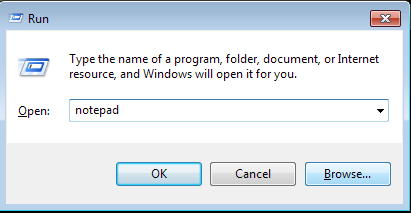


အိုေက ဒါဆိုရင္ notepad ပြင့္လာမွာျဖစ္ပါတယ္ notepad ထဲမွာေအာက္က code ေတြကို copy ယူျပီးထည္.ေပးလိုက္ပါ
FreeMem=Space(10240000000)


ဘာမွမခက္ဘူးေနာ္ စာေလးကလဲတိုတိုေလး အခုကၽြန္ေတာ္က အားလံုးနားလည္ေအာင္တစ္ခုျခင္းစီလုပ္ျပလို.သာ နည္းနည္းရွုပ္ေနတာ ကိုယ္လုပ္တက္တဲ့အဆင့္ေတြလဲေက်ာ္လုပ္သြားလို.ရတယ္ေနာ္..အားလံုးအိုကီျပီဆိုရင္ save မွတ္ပါမယ္
notepad အေပၚနားေလးက file ဆိုတာေလးကို ႏွိပ္လိုက္တာနဲ. က်လာတဲ့ box ထဲမွာ Save As ဆိုတာကိုကလစ္လိုက္ပါ
အိုေက လိုခ်င္တဲ့ ေနရာမွာမွတ္ပါကၽြန္ေတာ္ကေတာ့ Desktop ေပၚမွာပဲမွတ္လိုက္ပါတယ္ အေရးၾကီးဆံုးက 
file name ေနရာမွာ .vbs ျဖစ္ရပါမယ္ အေရွ.စာလံုးကိုေတာ့ၾကိဳက္တာေပးေပါ့ ကၽြန္ေတာ္ကေတာ့မူရင္းအတိုင္း hack.vbs လို.ေပးလိုက္ပါတယ္ က်န္တာေတာ့ဘာမွေျပာင္းစရာမလိုပါဘူးတကယ္လို. hack ေနရာမွာ clean ဘာညာေပးခ်င္လဲရပါတယ္
အေနာက္က .vbs ဆိုတာေတာ့ပါေအာင္ထည္.ေပးပါ။ျပီးသြားရင္ေတာ့ save ေပါ့...
အိုခီ ဒါဆိုရင္ ခုနမွတ္ထားတဲ့ေနရာမွာ ဒီလိုဖိုင္ေလးေရာက္ေနတာေတြ.ရပါမယ္ ........ 
အားလံုးပဲအဆင္ေျပပါေစဗ်ာ
                                    (ျမန္မာျပည္လူငယ္)

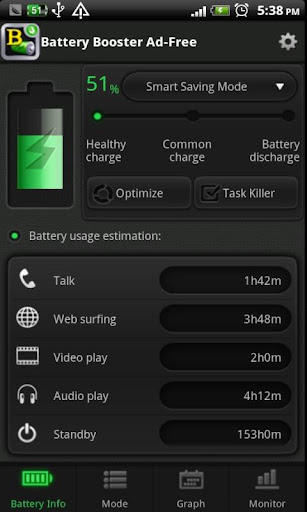
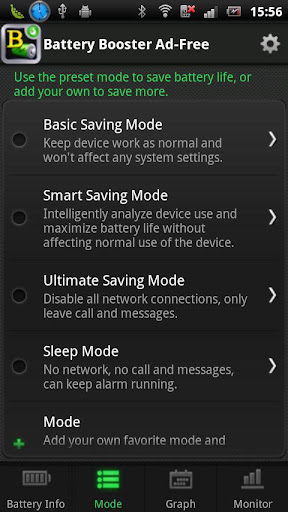
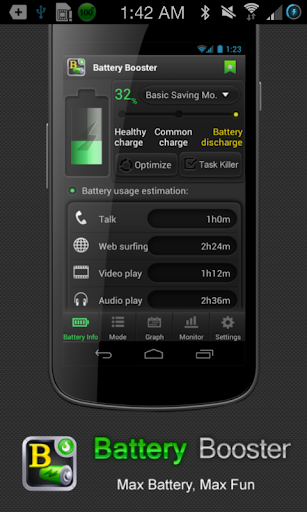
Jan012014 Battery Booster (Full) v6.9 APK

..
https://lh6.ggpht.com/b5WaEGXv98p9OROLbMZ4SLlvHEkkc8SRHfTrZjZnnYAQ0PiZlbKVK45_IACVoE9qH3s=w300 
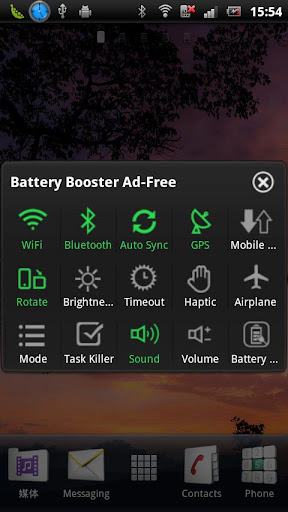
Battery Booster ကိုေတာ့ Android User တိုင္းသိၾကမွာပါ။ Android Phone 10လံုးမွာ 9လံုးေလာက္ကေတာ့ Battery Booster ကို အသံုးျပဳထားၾကပါတယ္။ အခုလည္း Version အသစ္ထြက္လာလို႕တင္ေပးလိုက္တာပါ။ ဖုန္းတစ္လံုးမွာ Battery Booster ကို 99.99% ေလာက္ကိုအသံုးျပဳသင့္ပါတယ္။ Battery ရဲ႕ ခံႏိုင္ရည္စြမ္းအား ကိုထိန္းသိမ္းေပးျပီး Battery သက္တမ္းကိုလည္း ရည္ရွည္သံုးႏိုင္ေအာင္လို႕ ေဆာင္ရြက္ေပးႏိုင္ပါတယ္။ Battery Booster ကေတာ့ လူတိုင္းသိထားျပီးသာျဖစ္လို႕ ဆက္ျပီးမရွင္းျပေတာ့ပါဘူးေနာ္။ Android OS 1.5 နွင့္အထက္ဖုန္းမ်ားမွာအသံုးျပဳႏိုင္ပါတယ္ဗ်ာ။


 **  Step-1.ေအာက္က Download Button ကိုႏွိပ္လိုက္ပါ  
**  Step-2. "5sec". ေလာက္ေစာင္႕ေပးပါ။

**  Step-3. "  << SKIP AD >>   ".ကိုႏွိပ္ေပးပါ။
**  Step-4. Download Link က်လာပါလိမ္႕မယ္။
**  အဆင္ေျပပါေစဗ်ာ။

Download

Comment

linkwithin

Related Posts Plugin for WordPress, Blogger...


Copyright @ 2013 MAUNG RUPER.

Designed by M@UNG RUP3R , င/ရမ